3.5 Connecting Cables
Precautions
l Make sure that the models of optical transceivers and optical cables match with SFP ports. The transmitting port on the local device should be connected to the receiving port on the peer device and vice versa.
l Avoid a small bend radius at the connector.
Steps
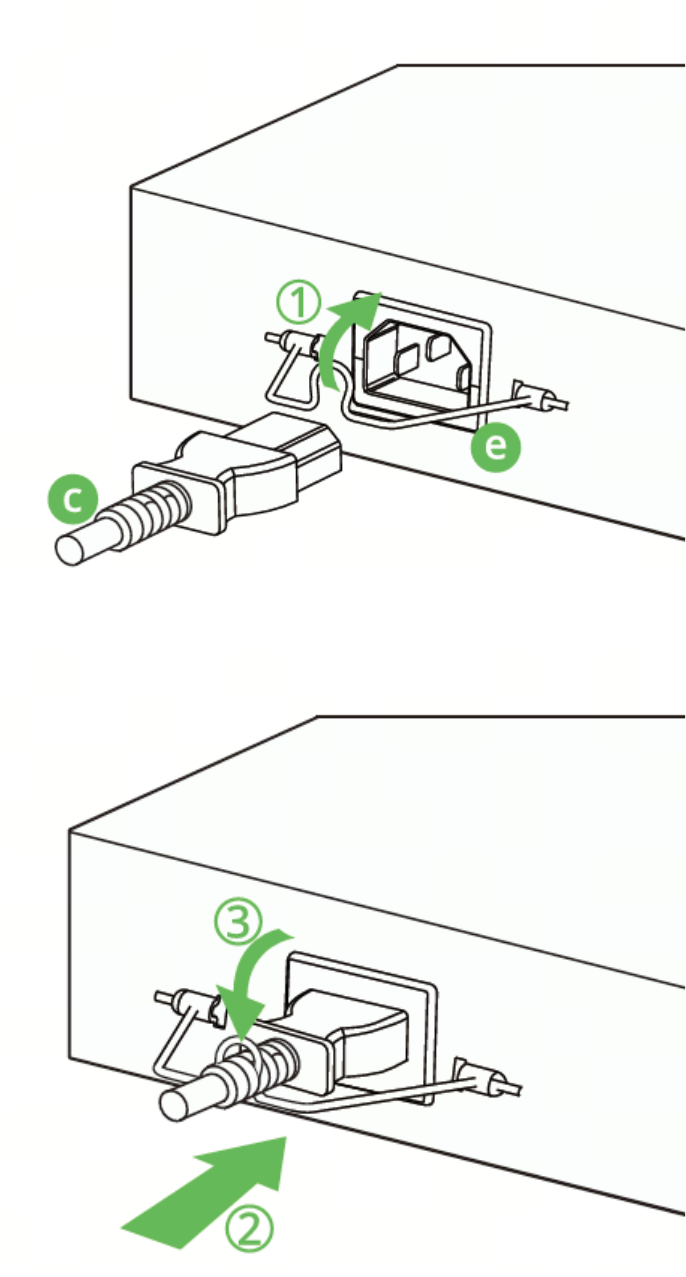
l Connect the power cord.
Insert the power cord retention clip into the power cord retention clip holes, place the power cord retention clip upward, insert the power cord, and then place the power cord retention clip downward to secure the power cord.
 Warning
Use the delivered power cords. Otherwise, security accidents may occur.
Figure3-6 Connecting the Power Cord
l Connect cables.
a. Connect the RJ45 connector of a twisted pair cable to the Ethernet port on the switch, and the other end to a managed device or PC.
b. Plug the SMF and MMF optical fibers into the corresponding ports according to the panel identification, and distinguish the transmitting and receiving ends of the optical fibers.